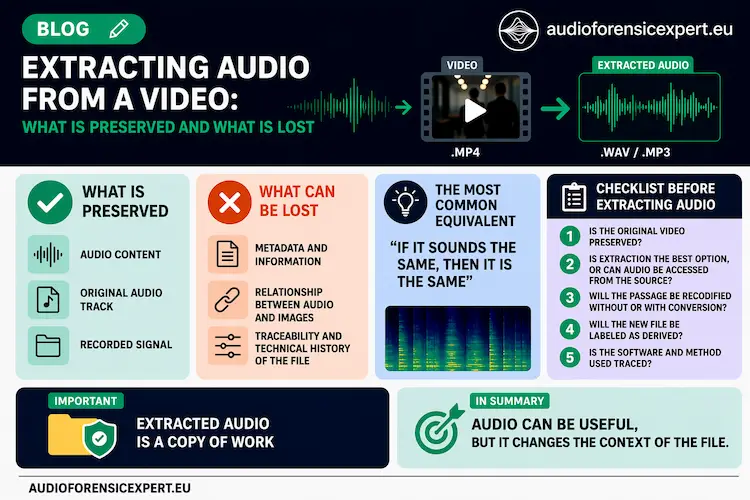
Separating an audio stream from a video file is not one single technical operation. The result depends on whether the audio is stream-copied, decoded to PCM, or decoded and re-encoded.
When saved as a separate output, audio extracted from video is a newly created digital file; stream copy can preserve the compressed audio bitstream without re-encoding. With stream copy, encoded audio packets can pass from the source container to an output container without decoding and re-encoding. A WAV export, by contrast, normally represents decoded PCM audio. Conversion to another compressed codec involves a further encoding stage.
This distinction matters in forensic work because the extracted file may be entirely suitable for listening, transcription or signal analysis while still not being equivalent to the source video file. The source container can retain video, additional audio streams, metadata and timing relationships that are absent from the audio-only derivative.
Technical guide by Roberto Ruggeri, forensic audio specialist· Last modified: 23 September 2026
What “Audio Extracted from Video” Actually Means
A multimedia container can hold video, zero or more audio streams and additional information. The current SWGDE Technical Overview of Digital Video Files, version 1.5 distinguishes the container or wrapper from the encoded streams stored within it. The ISO Base Media File Format specification likewise describes a structure that carries timing, media and structural information for timed audiovisual presentations.
| Operation | What Happens to the Audio | Forensic Meaning of the Output |
|---|---|---|
| Stream copy / demux and remux | Encoded audio packets are passed to an output without decoding and encoding. A compatible output container or elementary-stream format is still required. | A new standalone file is created, but the encoded audio need not undergo another codec generation. |
| Decode to PCM, commonly WAV | The compressed or encoded source stream is decoded to audio samples and written in a PCM representation. | A derived working representation is created. It can be useful for analysis, but it is not the original video container or original encoded audio stream. |
| Transcode / re-encode | The source stream is decoded and then encoded again, for example from AAC to MP3 or to another AAC configuration. | A further encoding stage is introduced. Its effects depend on the codecs, parameters and processing applied. |
The official FFmpeg documentation defines streamcopy as copying packets without decoding, filtering or encoding, and defines transcoding as decoding a stream and encoding it again. This is a technical distinction, not a conclusion about authenticity or evidential weight.
Why Stream Copy Is Not the Same as an “Original Audio File”
An audio stream embedded in a video may never have existed as a separate audio file during acquisition. Creating an AAC, M4A, WAV or other standalone output therefore creates a new digital item even when the underlying encoded audio packets are copied without a decode-and-encode cycle.
This is why the terms original audio file and extracted audio file should not be used interchangeably. The source video and the extracted output have different file structures and ordinarily different whole-file hashes. A matching hash between the complete source video and an audio-only derivative is neither expected nor a meaningful test of their relationship.
Where validation of the audio content across a conversion or re-wrapping step is relevant, a decoded-stream comparison may be used if the method and its own conversions are understood. SWGDE Technical Notes on FFmpeg for Forensic Audio Examination describes FFmpeg stream hashing as one way to compare decoded media streams. That type of check does not convert a derivative into the source file and does not replace preservation of the source container.
What the Source Video Can Preserve Beyond the Audio Track
An audio-only output isolates one part of a multimedia object. Depending on the source format, the complete video can contain information that is no longer represented in the same way after extraction, including:
- the video stream and visible events;
- multiple audio streams or tracks;
- container-level metadata and stream descriptors;
- subtitles, chapters or other timed data;
- stream start times, edit lists, time bases and synchronization information;
- relationships between a sound and a visible event on the video timeline.
This does not mean that an extracted audio file is unsuitable for examination. It means that the question determines which representation is required. If the issue concerns a spoken passage, noise pattern or acoustic feature, a documented audio derivative may be practical. If the question concerns whether a sound coincides with a visible action, the timing relationship between streams, or information stored only in the source container, the complete video remains necessary.
The current SWGDE video overview notes that advanced containers may hold subtitles, chapter information, metadata and synchronization details needed for playback. ISO/IEC 14496-12:2026 likewise defines timing and structural information as part of the ISO base media file format. These are reasons to preserve the audiovisual source rather than treating an audio export as a substitute for it.
Multiple Audio Streams: Selecting the Correct Track
Not every video contains a single audio stream. A file may include different languages, commentary, separate microphone channels, a multichannel mix or more than one recorded source. Before extraction, the streams should therefore be identified rather than assuming that the first or default track is the relevant one.
Useful stream-level information includes the stream index, codec, channel configuration, sample rate, duration, start time and any language or descriptive tag that is actually present. The selected output should remain traceable to the corresponding source stream. If more than one track may be relevant, preserving or documenting each one avoids silently substituting one audio source for another.
SWGDE’s FFmpeg technical notes for video examinations explicitly demonstrate stream mapping when handling audio inside multimedia files. The purpose of that documentation is not to prescribe one command for every case, but to make the selected input and output streams explicit.
When a WAV Derived from Video Is Useful
A PCM WAV derivative is often convenient because many audio-analysis applications can read it reliably and because subsequent processing does not require repeated decoding of the source codec. It may therefore be appropriate for critical listening, measurements, segmentation, restoration or other signal-level examinations.
However, converting AAC, MP3, Opus or another compressed stream to WAV does not recreate information that the source encoding had already discarded. The WAV represents the decoded result; it does not become a native uncompressed recording merely because its container is WAV.
Output parameters also matter. SWGDE’s FFmpeg notes for forensic video examinations warn that an unspecified WAV output can default to 16-bit PCM in the documented workflow and recommend explicitly addressing higher source quantization when relevant. Similar care applies to channel count, sample rate and any operation that could downmix, resample or otherwise change the decoded signal.
For the broader question of how encoding generations and conversions contribute to file history, see Codec Lineage in Forensic Audio. That guide examines re-encoding history; this page focuses on the relationship between a source video and the audio extracted from it.
Checks Specific to the Audio-Extraction Step
The following checks concern the extraction itself rather than the complete forensic workflow:
- Identify the source video. Record the file used for extraction and keep it distinct from later outputs.
- Identify the relevant audio stream. Confirm the stream index and its basic technical properties before creating the derivative.
- Classify the operation. State whether the audio was stream-copied, decoded to PCM, or transcoded to another codec.
- Record the implementation. Document the software and version and, when relevant, the command, mapping or export settings that determine the output.
- Check the resulting stream. Confirm duration, channel configuration, sample rate and other parameters that should be retained or intentionally changed.
- Validate the relationship where necessary. Use a method appropriate to the question, such as stream-level inspection or a decoded-stream comparison, rather than comparing whole-file hashes of different containers.
- Keep the derivative linked to its source. The extracted file should have an unambiguous identifier and should not replace the video from which it was created.
General principles for preservation, working copies, hashes, documentation and reporting are covered separately in Forensic Audio Methodology and Best Practice References.
Worked Example: MP4 Video with AAC Audio
Consider an MP4 file containing H.264 video and one AAC audio stream. Three operations can produce files that sound similar while having different technical relationships to the source.
| Output | Operation | Interpretation |
|---|---|---|
| AAC or compatible audio-only container | Stream copy | The AAC packets can be transferred without decoding and re-encoding. The output is still a new file with its own container or framing. |
| WAV PCM | Decode to PCM | The AAC stream is decoded to samples and written as PCM. It is useful as a working derivative but does not restore information discarded by AAC encoding. |
| MP3 | Decode and encode again | The AAC is decoded and then encoded as MP3. This introduces another codec stage and can add further lossy coding effects. |
If the technical question is simply what was said, a correctly created WAV may be fully adequate for listening or speech-oriented processing. If the question concerns the source container, the identity of multiple streams or audiovisual synchronization, the MP4 remains necessary. If the question concerns the broader history of prior encoding generations, the analysis moves into codec-lineage territory rather than audio extraction alone.
What Extracted Audio Can and Cannot Establish
| Question | Correct Scope |
|---|---|
| Was the selected audio stream separated without another encoding stage? | This can often be assessed from the extraction method and technical characteristics of the source and output. |
| Is the extracted file the same digital file as the source video? | No. It is a different file even when stream copy is used. |
| Does a WAV export prove the source was recorded as WAV? | No. WAV may simply be the decoded working representation of compressed audio in a video. |
| Does stream copy prove the source video is authentic? | No. Extraction method and authenticity are different questions. |
| Does an audio-only file preserve the complete audiovisual timeline? | Not necessarily. The source container must be retained when video/audio synchronization or container-level timing matters. |
If the issue is cuts, splices, integrity or possible post-recording modification, see Audio Authentication. If the issue is a technical feature caused by acquisition, compression, transmission or processing, see Audio Artifacts in Forensic Recordings. Keeping these questions separate prevents an extraction operation from being interpreted as evidence of tampering or, conversely, as proof of authenticity.
Limitations and Special Cases
- Proprietary video systems may not expose conventional streams. SWGDE notes that some DVR or proprietary systems store video samples, audio samples and metadata separately and assemble them for playback or export.
- Stream copy does not mean that every byte of the output file matches part of the source file. A new container, headers, timing representation or required bitstream filtering can alter the standalone output without a full decode-and-encode cycle.
- Software defaults can matter. Unspecified output settings may change bit depth or other parameters, so the actual operation should be documented rather than inferred from the file extension alone.
- An extracted derivative cannot recover information already lost upstream. Earlier compression, export or platform processing may have removed information before the video reached the examiner.
- An audio-only derivative may be unsuitable for audiovisual timing questions. Where the interpretation depends on a visible event or the relationship between streams, examination should return to the source video and its timing structure.
These limitations describe the technical scope of an extracted audio file. They do not determine admissibility, evidential weight or legal authenticity, which require the relevant technical and legal questions to be addressed separately.
Technical and Forensic References
- SWGDE Technical Overview of Digital Video Files — 17-V-001-1.5, Version 1.5 (21 July 2026).
- ISO/IEC 14496-12:2026 — ISO Base Media File Format.
- FFmpeg Documentation — Streamcopy and Transcoding.
- SWGDE Technical Notes on FFmpeg for Forensic Audio Examination — 23-A-001-1.1.
- SWGDE Technical Notes on FFmpeg for Forensic Video Examinations — 16-V-002-3.0.
- SWGDE Best Practices for Forensic Audio — 08-A-001-2.5.
References are used according to their scope. Their inclusion does not imply accreditation, certification, membership or endorsement by the organizations cited.
When the Audio Came from a Video File
For a case-specific assessment, keep the complete source video together with any extracted audio and describe how the derivative was created. The preliminary review can determine whether the audio-only file is sufficient for the requested examination or whether the source container and audiovisual timing are technically necessary.